js密码强度检测
更新时间:2026-09-29 21:40:59作者:fang
本文实例讲解了js密码强度检测的实现代码,分享给大家供大家参考,具体内容如下
运行效果图:

这段JavaScript代码比较实用,它完成用户注册时判断用户输入密码的强度,分强、弱、中三等级,它可以根据用户输入的密码显示对应的密码强弱等级,方便用户改进输入。
实现代码:
<html>
<head>
<title>JS判断密码强度</title>
<script language=javascript>
//判断输入密码的类型
function CharMode(iN){
if (iN>=48 && iN <=57) //数字
return 1;
if (iN>=65 && iN <=90) //大写
return 2;
if (iN>=97 && iN <=122) //小写
return 4;
else
return 8;
}
//bitTotal函数
//计算密码模式
function bitTotal(num){
modes=0;
for (i=0;i<4;i++){
if (num & 1) modes++;
num>>>=1;
}
return modes;
}
//返回强度级别
function checkStrong(sPW){
if (sPW.length<=4)
return 0; //密码太短
Modes=0;
for (i=0;i<sPW.length;i++){
//密码模式
Modes|=CharMode(sPW.charCodeAt(i));
}
return bitTotal(Modes);
}
//显示颜色
function pwStrength(pwd){
O_color="#eeeeee";
L_color="#FF0000";
M_color="#FF9900";
H_color="#33CC00";
if (pwd==null||pwd==''){
Lcolor=Mcolor=Hcolor=O_color;
}
else{
S_level=checkStrong(pwd);
switch(S_level) {
case 0:
Lcolor=Mcolor=Hcolor=O_color;
case 1:
Lcolor=L_color;
Mcolor=Hcolor=O_color;
break;
case 2:
Lcolor=Mcolor=M_color;
Hcolor=O_color;
break;
default:
Lcolor=Mcolor=Hcolor=H_color;
}
}
document.getElementById("strength_L").style.background=Lcolor;
document.getElementById("strength_M").style.background=Mcolor;
document.getElementById("strength_H").style.background=Hcolor;
return;
}
</script>
</head>
<body>
<form name=form1 action="" >
密码:<input type=password size=8 onKeyUp=pwStrength(this.value) onBlur=pwStrength(this.value)>
<br>密码强度:
<table width="210" border="1" cellspacing="0" cellpadding="1" bordercolor="#eeeeee" height="22" style='display:inline'>
<tr align="center" bgcolor="#f5f5f5">
<td width="33%" id="strength_L">弱</td>
<td width="33%" id="strength_M">中</td>
<td width="33%" id="strength_H">强</td>
</tr>
</table>
</form>
</body>
</html>
这一款先看一看效果图。
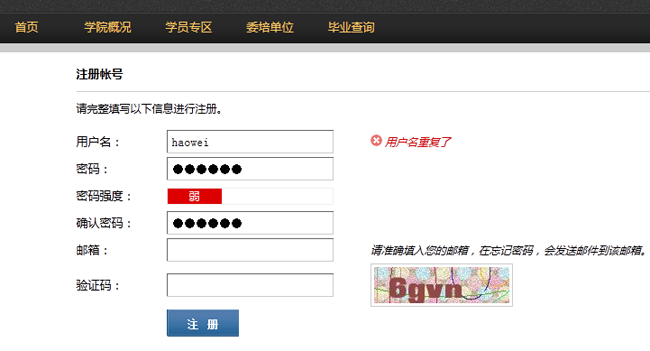
具体内容:
<script>
function AuthPasswd(string) {
if(string.length >=6) {
if(/[a-zA-Z]+/.test(string) && /[0-9]+/.test(string) && /W+D+/.test(string)) {
noticeAssign(1);
}else if(/[a-zA-Z]+/.test(string) || /[0-9]+/.test(string) || /W+D+/.test(string)) {
if(/[a-zA-Z]+/.test(string) && /[0-9]+/.test(string)) {
noticeAssign(-1);
}else if(/[a-zA-Z]+/.test(string) && /W+D+/.test(string)) {
noticeAssign(-1);
}else if(/[0-9]+/.test(string) && /W+D+/.test(string)) {
noticeAssign(-1);
}else{
noticeAssign(0);
}
}
}else{
noticeAssign(null);
}
}
function noticeAssign(num) {
if(num == 1) {
$('#weak').css({backgroundColor:'#009900'});
$('#middle').css({backgroundColor:'#009900'});
$('#strength').css({backgroundColor:'#009900'});
$('#strength').html('很强');
$('#middle').html('');
$('#weak').html('');
}else if(num == -1){
$('#weak').css({backgroundColor:'#ffcc33'});
$('#middle').css({backgroundColor:'#ffcc33'});
$('#strength').css({backgroundColor:''});
$('#weak').html('');
$('#middle').html('中');
$('#strength').html('');
}else if(num ==0) {
$('#weak').css({backgroundColor:'#dd0000'});
$('#middle').css({backgroundColor:''});
$('#strength').css({backgroundColor:''});
$('#weak').html('弱');
$('#middle').html('');
$('#strength').html('');
}else{
$('#weak').html(' ');
$('#middle').html(' ');
$('#strength').html(' ');
$('#weak').css({backgroundColor:''});
$('#middle').css({backgroundColor:''});
$('#strength').css({backgroundColor:''});
}
}
</script>
以上就是本文的全部内容,希望对大家学习javascript程序设计有所帮助。