JavaScript实现将数组数据添加到Select下拉框的方法
更新时间:2026-10-06 20:37:37作者:yezheng
本文实例讲述了JavaScript实现将数组数据添加到Select下拉框的方法。分享给大家供大家参考。具体如下:
这里演示将数组中的数据添加到Select下拉菜单中的效果,当你点击下拉框的时候,就动态加载了数据,更换Select内容的时候,直接替换数组中的内容就可以了。适合前端设计者实现前台的部分本地化脚本操作。
运行效果截图如下:
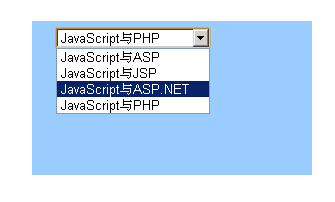
具体代码如下:
<!DOCTYPE HTML PUBLIC "-//W3C//DTD HTML 4.01 Transitional//EN"
"http://www.w3.org/TR/html4/loose.dtd">
<html>
<head>
<meta http-equiv="Content-Type" content="text/html; charset=gb2312">
<title>将数组中的数据添加到下拉菜单中</title>
<style type="text/css">
<!--
.style1 {color: #FFFFFF}
-->
</style>
<script type="text/javascript">
var counts;
counts=0;
arr = new Array("JavaScript与ASP","JavaScript与JSP","JavaScript与ASP.NET","JavaScript与PHP");
counts=arr.length;
function Myselect(){
var i;
for (i=0;i < counts; i++) {
document.form1.sel.options[i] = new Option(arr[i],i);
}
}
</script>
</head>
<body>
<table width="280" height="160" border="0" align="center" cellpadding="5" cellspacing="0">
<tr>
<td height="34" align="center"><span class="style1" style="font-weight:bold ">将数组中的数据添加到下拉菜单中</span></td>
</tr>
<tr>
<td align="center" valign="top" bgcolor="#9ACCFF"><form name="form1">
<table width="235" height="69" border="0" align="center" cellpadding="0" cellspacing="0">
<tr>
<td height="21"><select name="sel" id="sel" onFocus="Myselect()">
</select></td>
</tr>
<tr>
<td height="120"> </td>
</tr>
</table>
</form></td>
</tr>
</table>
</body>
</html>
希望本文所述对大家的javascript程序设计有所帮助。